Customer support is at a breaking point.
Users expect instant, accurate answers, 24/7 availability, and human-like understanding—while businesses struggle with rising ticket volumes, operational costs, and limited support teams. Traditional chatbots promised relief, but most delivered scripted flows, shallow answers, and frustrating user experiences.
That’s exactly the problem WeezIQ is built to solve.
What Is WeezIQ?
WeezIQ is an AI customer support agent designed to understand your business, answer real customer questions, and resolve issues—without constant human intervention.
Instead of relying on rigid decision trees or predefined intents, WeezIQ learns directly from your website content, documentation, FAQs, and knowledge base to deliver responses that are:
- Context-aware
- Accurate
- Business-specific
- Instantly available
The result? A support experience that feels natural for customers and scalable for businesses.
Why WeezIQ Exists?
Most AI chatbots fail for three reasons:
- They don’t truly understand your business
- They hallucinate or give vague answers
- They create more support tickets instead of resolving them
WeezIQ was built with a different philosophy:
AI should reduce support workload, not just deflect conversations.
By grounding responses in your real content and maintaining strict accuracy controls, WeezIQ acts as a reliable first-line support agent, not a risky experiment.
Autonomous by Design
WeezIQ isn’t just a chat interface—it’s an autonomous agent.
Once connected, it can:
- Answer repetitive support questions instantly
- Guide users through product usage
- Handle common troubleshooting scenarios
- Capture qualified leads when human follow-up is needed
All without requiring daily retraining or manual flow updates.
How To Use the Platform?
WeezIQ offers three types of plans:`
- Free Plan – Perfect for users who want to test the chatbot.
- Growth Plan – Ideal for early-stage startups and growing teams.
- Pro Plan – Designed for small businesses and teams looking to improve their customer support experience.
Adding Your Website Domain
Once you sign up for the app, you will see the Domains option in the left sidebar.
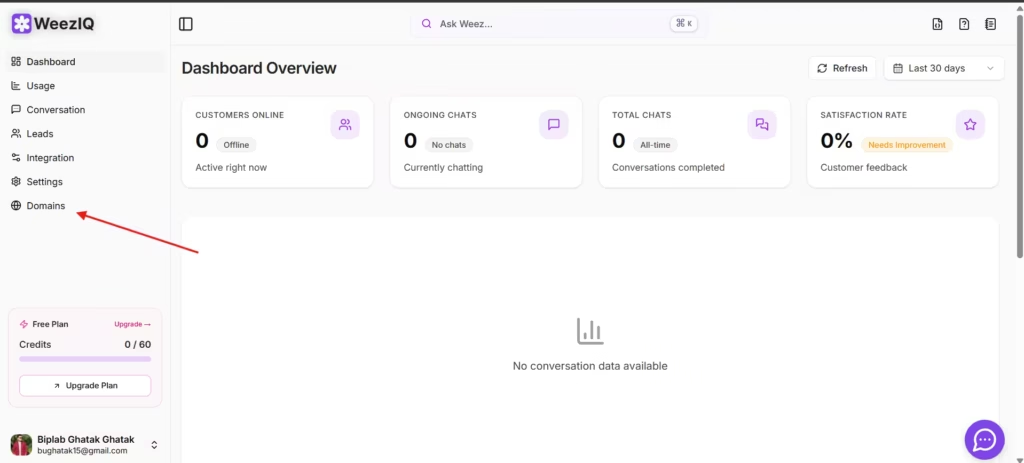
Click on the Domains menu to add your website URL.
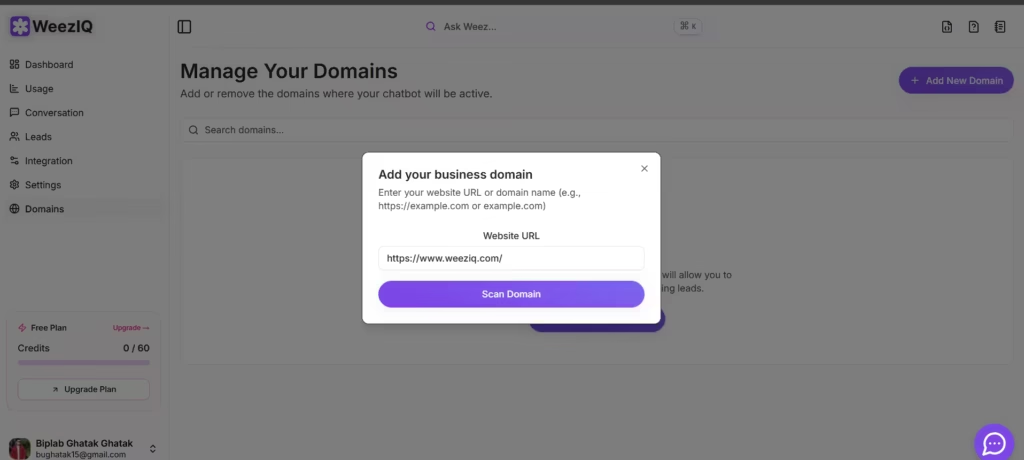
After adding the domain, the system will first try to locate your website’s sitemap.
- If no sitemap is available, the system will scan and fetch all links from your website’s homepage.
- If a sitemap is found, WeezIQ will automatically fetch all the URLs.
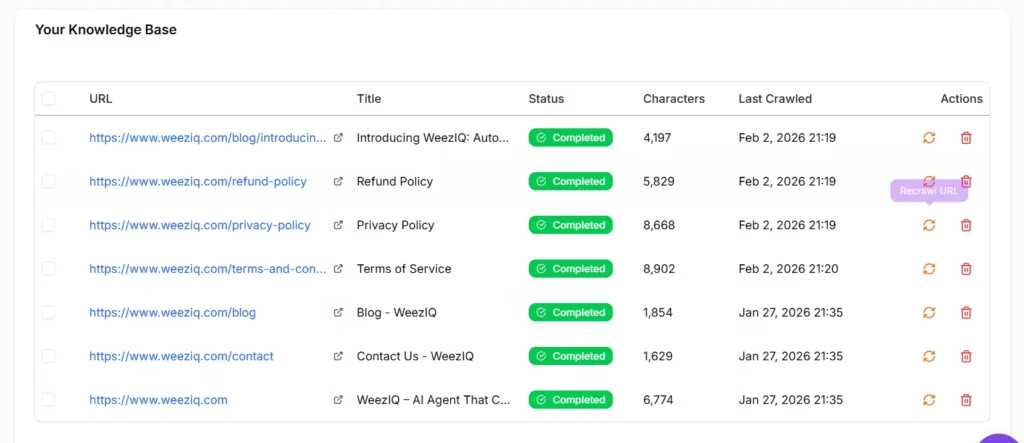
All scraped website data will be displayed here, and you can also see how many characters are used for each page.
Note: On the Free Plan, you can add up to 20 URLs at this time.
Uploading Files & FAQs
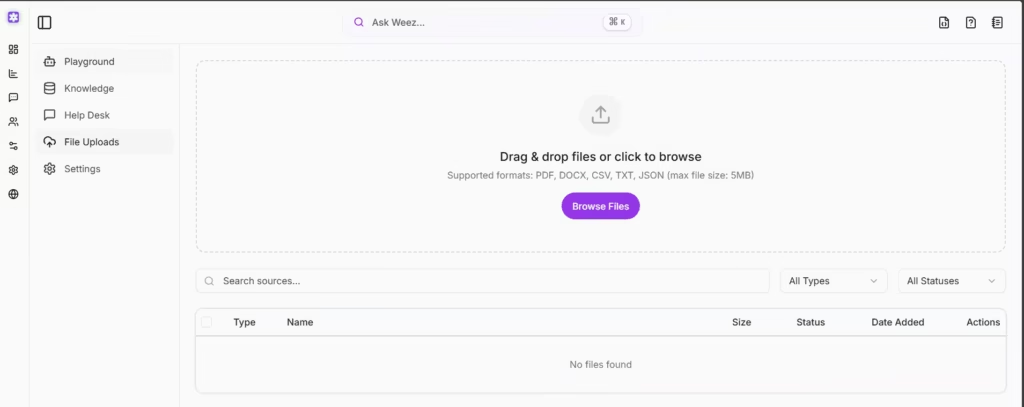
You can also upload files that contain information you want the chatbot to learn from.
Supported file formats include PDF, DOCX, JSON, MD, and TXT.
Additionally, there is an option to add FAQs, which can also be used as a knowledge source for the chatbot.
Customizing Your Chatbot
Once all information is added to the knowledge base and you’re confident about the data provided, you can start customizing the chatbot to match your website’s needs.
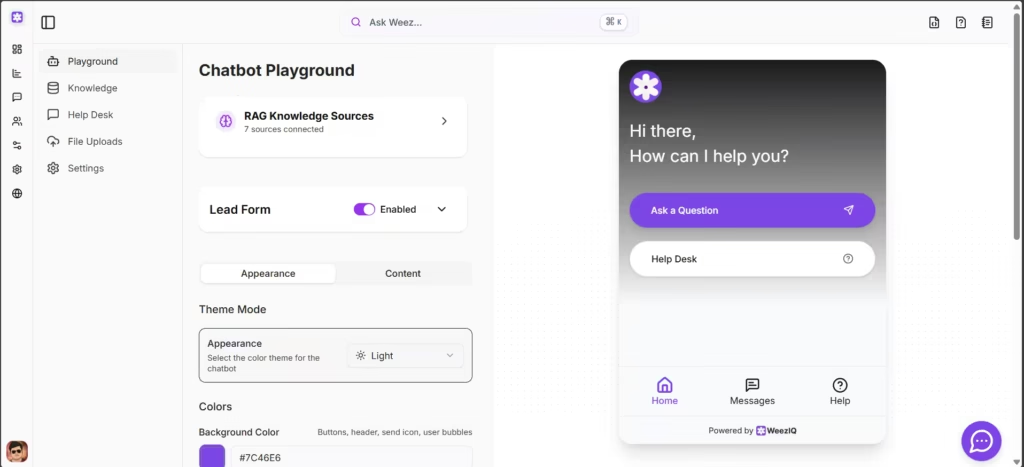
You can fully customize the chatbot to match your website’s theme, regardless of the plan you are on.
Customization options include:
- Custom welcome messages
- Lead capture forms
- Light and dark themes
- And much more…
You can also interact with the AI agent to test and evaluate its responses.
Note: Each AI response consumes 1 credit.
AI Model
Currently, WeezIQ uses the GPT-4.1 model, which offers the best overall performance.
More AI models will be added soon, allowing you to experiment and choose the one that best fits your business needs.
Launching the Chatbot Widget
Once customization is complete, voilà! You’re ready to launch the chatbot on your website.
To add the chatbot:
- Go to Domains → Settings
- Copy the provided script
- Paste it into your website’s
<head>tag or just before the closing</body>tag
Your AI-powered customer support chatbot will now be live.
One Agent, Multiple Roles
Unlike traditional tools that separate bots for sales, support, and onboarding, WeezIQ handles all three seamlessly:
- Customer Support: Resolve FAQs, product questions, and issues
- Customer Experience: Provide instant, consistent help across touchpoints
- Lead Assistance: Answer pre-sales questions and capture intent
All through a single, unified AI agent.
Privacy, Accuracy, and Trust First
AI is only useful if it’s trustworthy.
WeezIQ is built with:
- Business-specific data isolation
- Controlled response generation
- A focus on accuracy over speed
- Clear boundaries on what the AI can and cannot answer
Your data stays yours. Your customers get answers they can trust.
Customer support shouldn’t be reactive, expensive, or frustrating.